
Custom Workbench Design and Prototyping Workflow: A Procurement Decision Guide
Custom Workbench Design and Prototyping Workflow: A Procurement Decision Guide
For manufacturing enterprises, electronics assemblers, and automotive parts manufacturers, a "custom" workbench is rarely just about changing the length or width. It involves complex trade-offs between structural integrity, material selection, tool storage integration, and floor space utilization.
When evaluating potential suppliers for **custom workbench design and prototyping, decision-makers must look beyond standard catalog specifications. The following workflow breakdown helps you assess whether a manufacturer’s design capability matches your specific operational requirements, ensuring that the final installation supports your throughput and safety goals.
1. Requirement Discovery: Defining the Operational Baseline
The first step in any successful custom workstation project is translating operational needs into technical parameters. Generic requests often lead to over-engineered (expensive) or under-specified (unsafe) solutions.
Key Inputs for Design:
- Load Requirements:*
- Determine the maximum static and dynamic loads. For heavy-duty applications like hardware mold factories, standard steel plate tops may need reinforcement. For electronics assembly, anti-static properties are non-negotiable.
- Tooling & Storage Integration:*
- Identify the types of tools used. Do they require pegboard expansion for visual management? Do they need tiered drawers with specific weight capacities?
- Ergonomics & Height:*
- Standard heights may not suit all tasks. Consider if adjustable legs or specialized fitter benches are needed to reduce operator fatigue.
Decision Tip: Provide your supplier with a detailed list of tools, materials handled, and daily cycle times. This allows them to calculate accurate load distributions rather than applying a generic safety factor.
2. Structural Design & Material Selection Trade-offs
In the design phase, manufacturers propose configurations based on your inputs. Understanding the material implications is crucial for cost and performance optimization.
Common Configuration Scenarios:
- Composite Desktops:*
- A popular choice for general assembly involves a raw steel plate base layered with high-density fiberboard (HDF) or anti-static laminate. This offers high load capacity while protecting sensitive components. Trade-off: While durable, composite tops can be heavier and harder to clean compared to solid stainless steel.
- Steel Plate vs. Stainless Steel:*
- For maintenance and testing institutions requiring corrosion resistance, stainless steel is preferred. However, it comes at a higher cost and may have different welding/finishing tolerances.
- Frame Structure:*
- C-type cold-rolled steel frames are standard for their stability. Ensure the frame thickness matches the intended load. Thinner frames may suffice for light electronics but risk deformation in automotive parts turnover scenarios.
3. Prototyping and Verification: Bridging Design and Production
While full-scale prototyping is rare for standard workbenches due to cost, reputable manufacturers use digital simulations and component-level validation to mitigate risk.
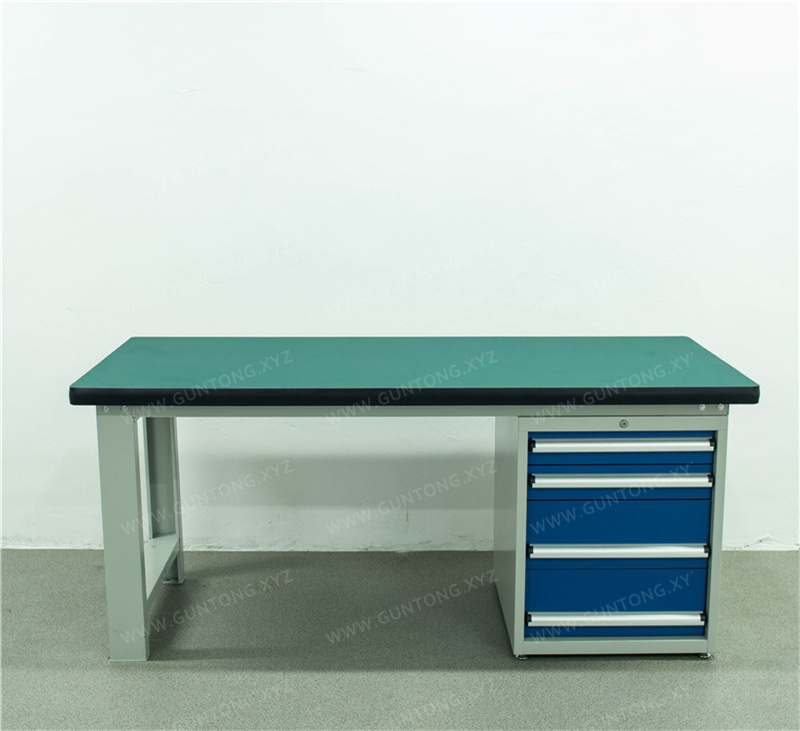
What to Verify Before Mass Production:
- Assembly Simulation:*
- Ask for 3D renderings or CAD drawings that show how the workbench integrates with existing lean pipes or automated storage accessories. Misalignments here cause significant installation delays.
- Drawer and Pegboard Compatibility:*
- If ordering units like the 4-Drawer 1-Door Tool Cart with Pegboard, verify the pegboard hole spacing (standard square-hole) against your existing tool holders. Incompatibility here renders the storage useless.
- Load Testing Standards:*
- Request evidence of load testing protocols. For example, shelves in a Pegboard Storage Cabinet should be verified for heavy-duty capacity per shelf. Ensure the manufacturer tests for both static load and dynamic impact (opening/closing drawers under load).
4. Implementation Boundaries and Risk Management
Customization introduces variables that can affect delivery timelines and site readiness.
- Site Constraints:*
- Measure floor flatness and ceiling height. Custom workbenches with tall cabinets may interfere with overhead lighting or crane operations in tight workshops.
- Lead Time Variance:*
- Standard items ship quickly. Custom designs involving non-standard colors, specific anti-static certifications, or complex integrated tooling require longer production cycles. Factor this into your production planning.
- Installation Complexity:*
- Ensure the supplier provides clear installation guidelines. Complex units with multiple drawers and pegboards require precise leveling to ensure smooth operation.
5. Acceptance Criteria: What to Check Upon Delivery
Before signing off on a custom order, conduct a physical inspection based on the agreed-upon design specs:
- Dimensional Accuracy: Check L×W×H against the drawing. Tolerances should be minimal to ensure alignment with adjacent stations.
- Surface Finish: Inspect for scratches, uneven coating, or sharp edges. PVC edge banding should be secure and flush.
- Functional Test: Open and close all drawers and doors. They should operate smoothly without binding. Pegboards should be securely fastened.
- Stability Test: Apply pressure to the desktop and sides. There should be no wobbling or creaking sounds, indicating proper frame rigidity.
Conclusion
A robust custom workbench design and prototyping workflow is defined by clear requirement definition, informed material trade-offs, and rigorous verification steps. By focusing on these key areas, procurement teams can avoid common pitfalls such as inadequate load capacity, incompatible storage solutions, and installation delays.
For manufacturers seeking to optimize their workshop layout, partnering with a provider who offers both standardized products and non-standard customization ensures flexibility without compromising on quality or safety.
Next Steps
To initiate a tailored design consultation for your specific application scenario:
- Define Your Needs: List your primary use case (e.g., electronics assembly, automotive parts handling, mold maintenance).
- Request a Layout Review: Share your floor plan and tool inventory for preliminary feedback.
- Compare Solutions: Evaluate proposed designs against your budget, timeline, and ergonomic requirements.
Contact Our Engineering Team for a detailed discussion on your custom workstation requirements.