
Standardizing Workshop Workstation Equipment Specifications: A Practical Framework for Multi-Station Projects
Why Standardization Fails in Multi-Station Workstation Projects
Manufacturing enterprises expanding production lines or consolidating facilities frequently encounter a common failure: workstation equipment arrives with mismatched heights, incompatible drawer configurations, or load ratings that do not align with actual tool weights. The root cause is rarely supplier error. It is usually the absence of a unified specification framework before procurement begins.
Without standardized parameters, a single facility may end up with workbenches at three different heights, tool cabinets with incompatible shelf spacing, and tool carts whose casters cannot handle the actual load. This fragmentation increases maintenance complexity, complicates 6S implementation, and creates safety hazards when operators move between stations.
Core Dimensions That Require Standardization
Workbench Footprint and Ergonomic Height
For heavy-duty workshop applications, workbench dimensions typically cluster around three standard footprints: 1500×750 mm, 1800×750 mm, and 2100×750 mm, with a working height of 800 mm. These dimensions accommodate most manual assembly, fitting, and inspection tasks while allowing efficient floor space planning.
When standardizing across a multi-station project, select one primary footprint for general-purpose stations and reserve the larger format only for stations requiring dual-operator access or extended tool layouts. Mixing all three sizes without a clear allocation rule creates wasted floor space and inconsistent workflow patterns.
Load Capacity Tiers
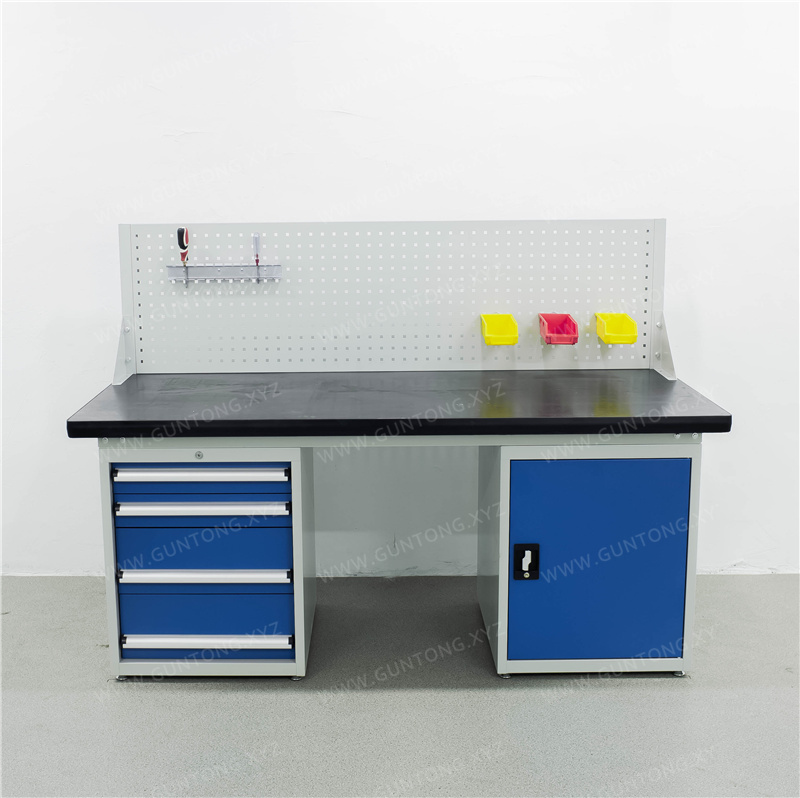
Load capacity is the most frequently misunderstood specification. A composite desktop workbench built with 100×50×1.5 mm C-type cold-rolled steel legs and a 50 mm high-density fiberboard composite top typically achieves a total load capacity of 1000 kg. However, this rating applies to the complete structure, not individual components.
For drawer-equipped configurations, each drawer may carry an independent rating—commonly 80 kg per drawer for single-rail sliding systems that open to 85% extension. Standardizing load tiers means defining three categories:
- Light-duty stations
- (electronics assembly, inspection): 300–500 kg total capacity
- Medium-duty stations
- (general fitting, maintenance): 800–1000 kg total capacity
- Heavy-duty stations
- (mold repair, automotive parts handling): 1000+ kg with reinforced frames
Assigning each production zone to one tier prevents over-specification (which inflates cost) and under-specification (which creates safety risk).
Material and Surface Standardization
Desktop Materials by Application
Desktop selection should follow the contamination and wear profile of each zone:
- Composite desktops
- (5 mm steel plate + 45 mm high-density fiberboard with PVC edge banding) suit general fitting, mechanical assembly, and maintenance stations where impact resistance matters.
- Stainless steel surfaces
- are mandatory for environments exposed to moisture, chemical solvents, or strict hygiene requirements—such as food processing equipment assembly or clean-room adjacent work. Stainless steel resists weak corrosive media including steam, water, and acid-alkali exposure, making it the only viable choice for these conditions.
- Anti-static laminates
- are required for electronics manufacturing and testing stations where electrostatic discharge can damage components.
Standardizing material by zone—not by individual preference—ensures consistent performance and simplifies replacement planning.
Frame and Cabinet Body Materials
Cold-rolled steel at 1.0 mm or 1.2 mm thickness is the standard for tool cabinet bodies and storage racks. For multi-station projects, specifying a single thickness across all cabinets within a zone ensures uniform load ratings and visual consistency. Pegboard panels should use standard square-hole patterns to maintain compatibility with hooks and tool holders across all stations.
Accessory and Configuration Standardization
Drawer Configurations
Drawer layouts should be standardized by task type rather than customized per station. A practical framework:
- Two-drawer configurations
- for stations with minimal tool variety (inspection, testing)
- Three-drawer horizontal configurations
- for general assembly stations requiring tiered tool organization
- Four-drawer configurations
- (e.g., 100 mm × 2 + 200 mm × 2) for maintenance and fitting stations with diverse tool sizes
Each configuration should use identical rail systems and load ratings to enable cross-station drawer interchangeability during maintenance.
Pegboard and Hanging Systems
For stations requiring visual tool management, standardize on a single pegboard height—commonly 500 mm—and a consistent square-hole pattern. This ensures that hooks, brackets, and tool holders purchased for one station work at any other station in the network.
Mobility Accessories
When tool carts are part of the deployment, caster specifications must align with the loaded weight. A four-drawer tool cart with pegboard and door cabinet requires casters rated for the combined weight of the cart body plus maximum drawer load. Standardizing caster diameter and brake type across all mobile units simplifies replacement inventory.
Implementation Steps for Procurement Teams
- Audit existing stations: Document current dimensions, load ratings, and materials at each station. Identify the three most common configurations.
- Define zone-based tiers: Map each production area to a load tier, material type, and drawer configuration.
- Create a specification matrix: Build a single table listing approved dimensions, materials, and accessories for each zone type.
- Validate with load calculations: Confirm that the selected frame profile (e.g., C-type steel at 100×50×1.5 mm) meets the maximum expected load with a safety margin.
- Pilot one zone: Deploy standardized equipment in a single area before facility-wide rollout to identify fit and workflow issues.
Boundaries and Risks
Standardization does not mean forcing every station into one configuration. Non-standard requirements—such as automated storage and retrieval system integration where tote-based miniload systems handle 50–100 kg per tote at rack heights up to 12 meters—should be treated as separate project scopes with their own specification frameworks.
Additionally, standardizing on a single supplier for core workstation equipment reduces compatibility risk but requires verifying that the supplier supports both standardized production and non-standard customization for edge cases. Guang'ErMei Precision Components, for example, maintains dual capabilities in standardized batch production and custom fabrication, covering workbenches, tool cabinets, tool carts, mold racks, and automated storage accessories from design through on-site installation.
Next Steps
If your facility is planning a multi-station deployment or consolidation, begin by documenting your current equipment specifications and identifying the top three configuration patterns. Use this data to build your zone-based standardization matrix before issuing procurement requests.
For configuration support or to request a specification review for your workstation project, contact Guang'ErMei Precision Components to discuss your load requirements, dimensional constraints, and material needs.