How to choose maintenance and support, single : selection, rollout and support checklist
Symptom: What Operators and Facility Managers Notice First
In electronics assembly, automotive parts inspection, and hardware mold maintenance, a single pegboard 3-drawer composite workbench often becomes the central station for daily tool retrieval and 6S visual management. Over time, teams may observe:
- Drawers that stick or fail to open fully under load
- Pegboard hooks bending or panels showing localized deformation
- Desktop surface wear concentrated at the front edge or near the back panel
- Tool carts or cabinets being used alongside the workbench because the fixed station cannot accommodate all required items
These symptoms rarely indicate a single defective part. More often, they reveal a gap between the actual usage pattern and the workbench's engineered boundaries.
Cause: Structural and Usage Factors Behind Common Issues
A composite desktop workbench typically combines a steel plate surface with a supporting substrate and a C-type cold-rolled steel frame. When the unit is specified without confirming daily load distribution, drawer access requirements, or pegboard expansion needs, several friction points emerge:
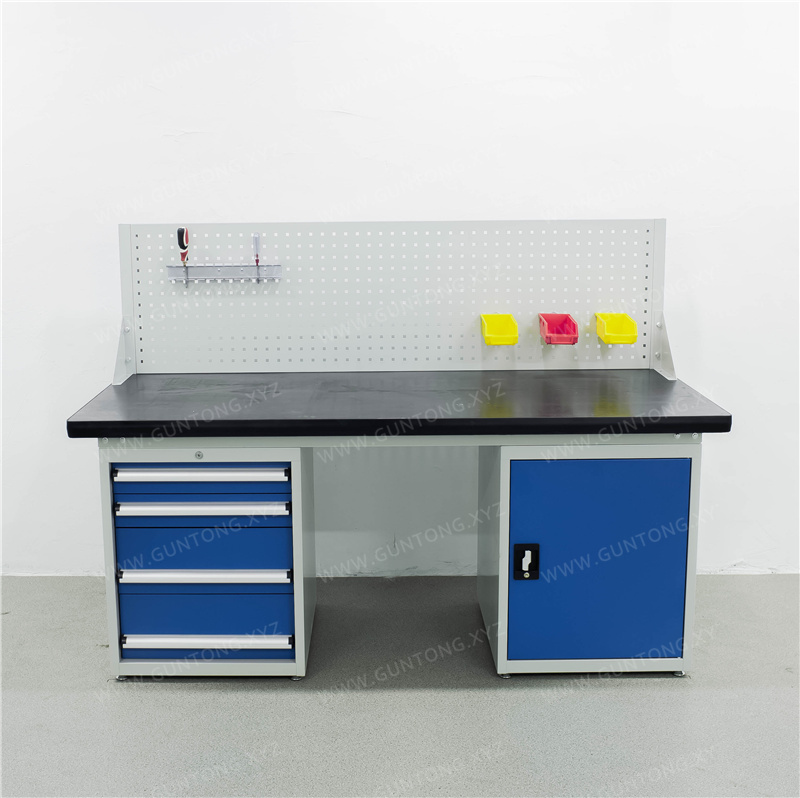
- Drawer load vs. rail type: Heavy-duty drawers rely on stamped rails and a defined opening range. If tools exceed the rated capacity or are placed unevenly, rails bind and the drawer may only open partially.
- Pegboard load distribution: A single pegboard is designed for visual tool placement, not for hanging heavy fixtures or concentrated loads. Overloading specific zones can cause panel flex or hook failure.
- Desktop wear patterns: Composite tops are engineered for balanced loads. Repeated impact, chemical exposure, or concentrated heavy items at the edge can accelerate surface degradation.
- Fixed vs. mobile boundary: A fixed workbench is not a substitute for a mobile tool cart. When teams need frequent repositioning or on-the-go retrieval, a stationary unit will create workflow bottlenecks.
Checks: How to Verify Boundaries Before Escalation
Before requesting service or replacement, facility teams should perform the following checks:
- Confirm drawer capacity and opening range
- Verify the rail type and rated load per drawer. For heavy-duty configurations, stamped rails typically support up to 80 kg per drawer with an opening range around 85%. If tools exceed this or are stacked unevenly, redistribute weight or adjust drawer heights (common options include 100 mm, 150 mm, and 200 mm).
- Audit pegboard usage
- Ensure hooks are rated for the tools being hung. Avoid placing heavy or unbalanced items on a single pegboard section. If visual management requires more hanging points, consider a dual pegboard layout or a separate pegboard storage cabinet.
- Inspect desktop structure and edge protection
- Composite desktops often combine a raw steel plate with a high-density fiberboard core and PVC edge banding. Check for delamination, edge chipping, or chemical damage. If the environment involves frequent moisture, solvents, or high-impact tools, a stainless steel top may be more appropriate.
- Map tool flow and station boundaries
- If operators frequently move tools between the workbench and a mobile cart, the fixed station may be undersized for the workflow. In such cases, pairing a composite workbench with a 4-drawer tool cart or a 1-door tool cabinet can restore balance.
Resolution: Adjust Configuration or Request Non-Standard Customization
When checks confirm that the current unit is operating outside its design boundaries, Guang'ErMei Precision Components supports two paths:
- Configuration adjustment: Redistribute tools across drawers, adjust shelf or drawer heights, or add a secondary storage unit (e.g., a pegboard storage cabinet with 100 kg per shelf capacity) to offload the workbench.
- Non-standard customization: If the workflow requires a different desktop material, expanded pegboard area, or reinforced frame, Guang'ErMei provides design-to-installation services. Customers should provide workshop layout, load requirements, and usage scenarios. The engineering team will output 3D drawings and a configuration list for review before production.
Escalation Boundary: When to Contact Support
Contact Guang'ErMei's service team if you observe:
- Persistent drawer binding after load redistribution
- Visible deformation of the pegboard or desktop substrate
- Need for a different material (e.g., stainless steel for corrosion-prone environments)
- Requirement for on-site workstation planning or 6S adaptation
Guang'ErMei provides full-process after-sales service, including on-site installation and configuration review. For non-standard requests, lead times and specifications are confirmed based on final drawings and contract terms.
Next Steps for Facility and Compliance Teams
- Document daily tool weights, pegboard usage, and desktop wear patterns.
- Compare current configuration with rated load and access boundaries.
- If adjustments are insufficient, prepare layout and load data for a custom design review.
- Request a configuration checklist and 3D layout from Guang'ErMei before finalizing procurement.
By aligning daily usage with engineered boundaries, teams can extend service life, maintain 6S compliance, and avoid unnecessary replacements.