
Maintenance and Support Planning for Single Pegboard 3-Drawer Composite Workbenches
When Maintenance and Support Planning Starts
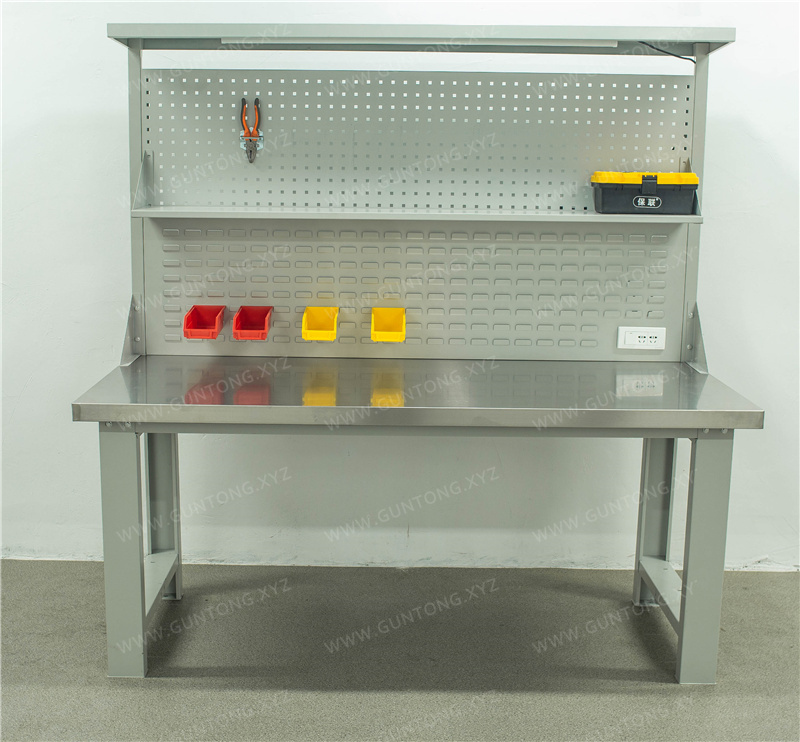
In electronics assembly lines and automotive parts maintenance areas, a single pegboard 3-drawer composite workbench is not just a surface—it is a structured tool management node. Maintenance and support planning must begin before installation, focusing on verified load boundaries, drawer access limits, and long-term inspection routines rather than reactive repairs.
What Maintenance Leads Should Verify Before Deployment
Frame and Load Boundaries
The structural baseline is defined by a C-type cold-rolled steel frame with a 100×50×1.5 mm cross-section. Verified composite workbench configurations show a total load capacity of 1000 kg for the desktop system. This rating applies to evenly distributed loads across the work surface and does not cover concentrated point loads from heavy machinery or unbalanced tool stacks. Maintenance planning should include load distribution checks during tool placement audits.
Drawer Access and Wear Points
Three-drawer configurations typically use single-rail guides with an approximate 85% opening rate. Each drawer is rated for around 80 kg. In practice, maintenance teams should monitor rail alignment, drawer panel thickness, and guide wear after 6–12 months of high-frequency use. Overloading beyond rated capacity accelerates guide deformation and increases the risk of drawer misalignment.
Pegboard and Surface Integrity
The square-hole pegboard supports visual tool management and flexible accessory mounting. The composite desktop structure combines a high-density core with a wear-resistant surface layer and black PVC edge banding. Maintenance checks should focus on edge banding adhesion, surface scratches near high-traffic tool zones, and pegboard hook retention after repeated repositioning.
Implementation Boundaries and Risk Controls
- Non-standard customization
- requires confirmed drawings before production. Standard dimensions such as 1500×750×800 mm, 1800×750×800 mm, and 2100×750×800 mm cover most workshop layouts, but custom cutouts, reinforced zones, or integrated power modules must be specified upfront.
- Load ratings are not universal
- across all workstation types. The 1000 kg total capacity and 80 kg per drawer apply to verified composite workbench configurations, not to stainless steel variants or heavy-duty fitter benches with different frame profiles.
- Maintenance and support scope
- includes on-site installation guidance, load-bearing design review, and after-sales service. Routine inspections, guide lubrication, and pegboard accessory audits should be scheduled as part of facility upkeep, not treated as ad-hoc repairs.
Selection and Maintenance Checklist
- Confirm frame profile (100×50×1.5 mm C-steel) and total load rating (1000 kg) against actual tool weight distribution.
- Verify drawer opening rate (~85%) and per-drawer capacity (~80 kg) for the intended tool mix.
- Map pegboard accessory layout to avoid concentrated stress points on the desktop edge.
- Schedule 6-month guide and rail inspections; replace worn components before alignment issues affect 6S compliance.
- Keep installation drawings and load specifications on file for future audits or workstation reconfiguration.
Next Steps
If your facility is scaling workstation layouts or transitioning from ad-hoc tool storage to structured 6S management, review your current load distribution and drawer usage patterns against verified composite workbench specifications. Guang'ErMei Precision Components provides design, production, installation, and after-sales support for standardized and custom workstation equipment. Contact the engineering team with your layout dimensions, tool weight estimates, and pegboard accessory requirements to receive a configuration review and maintenance planning guide.
For detailed product specifications or custom workstation planning, visit the composite workbench product page or request a workstation layout consultation.