
How to Navigate Workstation Equipment by Application Scenario: A Product Category Framework for Manufacturing Buyers
Why Do Manufacturing Buyers Struggle to Match Equipment to Their Workshop?
Most workstation equipment catalogs organize products by type—workbenches, tool cabinets, tool carts—without connecting them to the environments where they actually perform. A procurement lead at an electronics assembly plant, a mold shop supervisor, or a warehouse operations manager each face the same problem: the product list is long, but the path from "product category" to "my specific workshop condition" is unclear.
This article addresses that gap. It provides a structured navigation approach for filtering workbench, tool cabinet, and tool cart product lines by application scenario, helping technical evaluators move from browsing to confident specification matching.
Who Needs This Navigation Approach?
The following buyer profiles encounter the most friction when selecting workstation equipment without scenario-based filtering:
- Electronics and electrical appliance manufacturers
- evaluating anti-static surfaces and precision assembly configurations
- Automotive parts producers
- matching heavy-duty workbenches and turnover racks to component weight and handling frequency
- Hardware mold factories
- verifying frame rigidity and desktop durability for die maintenance tasks
- Maintenance and testing institutions
- balancing tool accessibility with mobile cart deployment
- Warehousing and logistics operations
- integrating lean pipe systems and automated storage accessories
- Vocational training centers
- requiring flexible, multi-station layouts for instructional workflows
Each of these environments imposes different constraints on load capacity, surface material, storage density, and mobility—constraints that generic product categories alone do not resolve.
Step 1: Filter Workbenches by Desktop Material and Load Constraint
Workbenches are the most scenario-dependent product category. The first filtering decision should be desktop material, because it directly determines which tasks the bench can support.
Composite Desktop Workbenches
Suitable for general assembly, inspection, and light-to-medium duty tasks. A typical configuration uses a thick composite desktop mounted on a C-type cold-rolled steel frame. These benches integrate pegboard back panels for tool organization and support drawer or cabinet add-ons for component storage. The composite surface provides a stable, non-marring work area appropriate for electronics sub-assembly and testing stations.
Steel Plate Desktop Workbenches
Required when tasks involve heavy components, torque operations, or repeated impact. A steel plate composite desktop—bonding a raw steel plate layer with a high-density fiberboard core and protective edge banding—delivers the rigidity needed for mold maintenance and hardware repair. Drawer-equipped variants keep fasteners, gauges, and maintenance tools organized at the point of use.
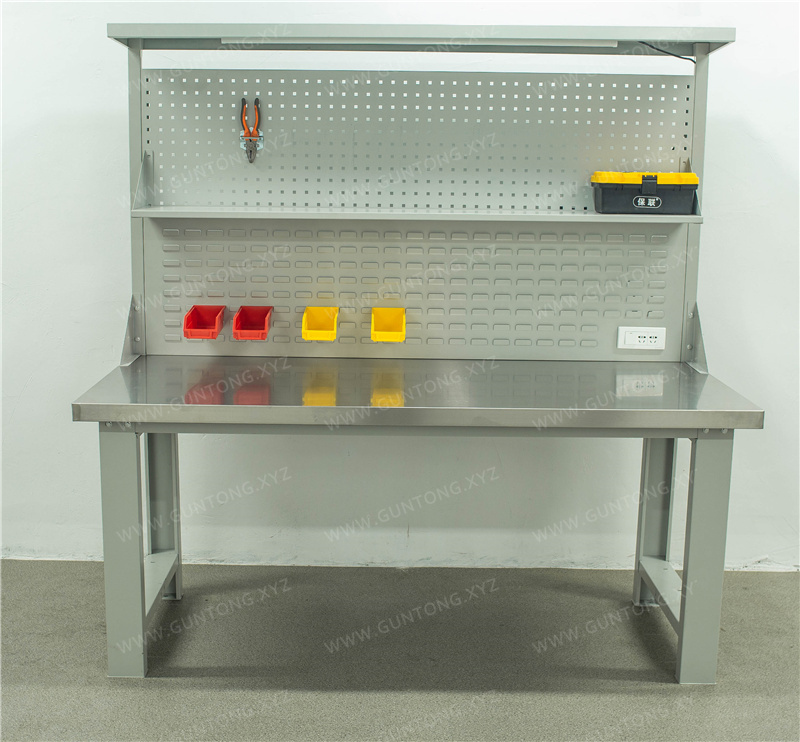
Stainless Steel Workbenches
Deployed in environments requiring corrosion resistance, hygiene compliance, or frequent cleaning. Common in food-related manufacturing adjacencies, laboratory testing stations, and clean-adjacent workshops.
Anti-Static Workbenches
Mandatory for electronics manufacturing environments where electrostatic discharge can damage sensitive components. These benches integrate ESD-dissipative surfaces and grounding provisions.
Selection Checkpoint: Before selecting a workbench, document your heaviest single-point load, your primary task type (assembly, repair, inspection, testing), and whether your environment requires ESD protection or corrosion resistance. Match these to the desktop material category first, then evaluate frame dimensions and accessory compatibility.
Step 2: Filter Tool Cabinets by Storage Density and Access Pattern
Tool cabinets differ from workbenches in their primary function: they prioritize storage capacity and organized retrieval over active work surface area. The filtering logic here centers on how frequently tools are accessed and how much variety must be stored.
Pegboard Storage Cabinets
Best for environments where visual tool management and quick retrieval matter. An inner half-pegboard configuration—combining interior shelf storage with pegboard panels on both the upper interior section and the cabinet door—supports dual-access workflows. Cold-rolled steel construction with adjustable shelves accommodates varying tool sizes. These cabinets serve maintenance workshops, tool cribs, and production-adjacent storage points where operators need to see and grab tools without opening multiple compartments.
Drawer-Based Tool Cabinets
Suited for environments with high tool variety and a need for dust protection or secure storage. Drawer configurations with tiered heights accommodate everything from small precision instruments to larger hand tools. Single-rail drawer mechanisms with high extension ratios improve access to rear-stored items.
Selection Checkpoint: Map your tool retrieval frequency. If operators access the same tools multiple times per shift, prioritize pegboard visibility. If tools vary widely in size and require protected storage, prioritize drawer tiering. Verify shelf or drawer load ratings against your heaviest stored items.
Step 3: Filter Tool Carts by Mobility Requirement and Task Kit Size
Tool carts serve a bridging function—they bring storage to the point of use. The filtering criteria here are drawer configuration, pegboard integration for visual management, and structural stability during transit.
Pegboard-Equipped Tool Carts
Ideal for maintenance teams, kitting operations, and cross-station support tasks. A cart combining tiered drawers with a square-hole pegboard back panel allows operators to transport a complete task kit while keeping frequently used tools visually accessible. Drawer heights in varied increments accommodate both small fasteners and medium-sized power tools.
Drawer-Only Tool Carts
Better suited for environments where tools must remain protected during transport—such as precision instrument calibration teams or clean-adjacent maintenance roles.
Selection Checkpoint: Determine whether your cart will carry tools for a single operator at a fixed station or support multiple stations across a shift. The first scenario favors compact drawer configurations; the second favors pegboard integration for rapid visual identification. Confirm that caster specifications match your floor surface and that overall cart stability is rated for your loaded transit conditions.
Step 4: Cross-Reference Categories for Complete Workstation Deployment
Rarely does a workshop need only one product category. Effective workstation planning combines elements across categories:
- An electronics assembly cell
- typically pairs an anti-static composite workbench with a pegboard storage cabinet for component reels and a mobile cart for shift-change kitting.
- A mold maintenance bay
- integrates a steel plate desktop workbench, a half-pegboard cabinet for die maintenance tools, and dedicated mold racks for work-in-progress.
- A vocational training workshop
- combines adjustable workbenches with visible pegboard cabinets to support instructional workflows and student tool accountability.
When navigating product catalogs, look for configuration compatibility between categories—matching pegboard hole patterns, consistent frame materials, and complementary dimensional standards. This reduces integration risk during deployment.
Boundaries and Limitations of Scenario-Based Filtering
This navigation framework addresses standard and semi-custom workstation equipment selection. It does not replace:
- Structural engineering assessments for mezzanine-integrated or multi-level workstation platforms
- Cleanroom-specific certification requirements for ISO-classified environments
- Full automated storage and retrieval system (AS/RS) design, though compatible accessories for tote-based systems are available within defined load and height parameters
For projects extending beyond standard workstation configurations, direct technical consultation is necessary to verify compatibility between product line capabilities and facility-specific infrastructure requirements.
Implementation Steps for Procurement Teams
- Document your primary application scenario—identify the industry environment, task types, and environmental constraints (ESD, corrosion, load, hygiene).
- Map each workstation to a product category—determine whether the primary need is an active work surface (workbench), organized storage (cabinet), or mobile tool delivery (cart).
- Apply the filtering checkpoints outlined above for each category—desktop material and load for workbenches, access pattern and storage density for cabinets, mobility and kit size for carts.
- Cross-reference complementary products—verify that pegboard patterns, frame materials, and dimensional standards align across categories.
- Flag non-standard requirements early—custom dimensions, specialized surface treatments, or integrated multi-unit layouts should be communicated to the technical team before finalizing specifications.
Next Steps
If your facility's application scenario aligns with the categories and constraints outlined above, begin by mapping your primary workstations to the relevant product filters. For standard configurations, product detail pages provide verified specifications for direct comparison. For non-standard requirements—including custom dimensions, specialized desktop materials, or multi-unit workstation layouts—contact Guang'ErMei's technical team with your scenario parameters to receive a configuration proposal grounded in verified product capabilities and application experience.