
Workstation Equipment Features Supporting 6S Management Implementation
Defining 6S Compliance Through Verified Equipment Specifications
For operations managers and implementation leads, integrating 6S management into a workshop requires engineering the physical environment to enforce standardization. The "Sort" (Seiri) and "Set in Order" (Seiton) phases often fail when equipment lacks defined storage boundaries or adequate load capacity. Successful 6S workstation equipment must provide fixed locations for every tool and material while withstanding actual operational loads without deformation.
When preparing for first-time 6S adoption, the primary technical criterion is matching equipment specifications to process requirements. Generic furniture cannot sustain 6S because it lacks the modularity for visual management and the structural integrity for heavy-duty industrial use. Verified equipment solutions, such as those from Guang'ErMei Precision Components, address this by combining standardized production with non-standard customization, ensuring that workbenches and storage units align with specific workflow constraints rather than forcing workflows to adapt to inadequate furniture.
Step 1: Establishing Load Capacity Baselines for Safety
The foundation of any 6S-compliant workstation is safety. Overloaded shelves or unstable workbenches create immediate hazards and undermine the "Safety" pillar of 6S. Before selecting equipment, you must verify load ratings against maximum static and dynamic loads for each station.
- Workbench Structural Integrity:*
- For heavy assembly or mold maintenance, verify the frame and desktop composition. Verified product data indicates that composite desktop workbenches utilizing C-type cold-rolled steel legs and green composite tops can support an overall load capacity of 1000kg. This specification is critical for preventing sagging over time, which disrupts levelness and organization.
- Drawer Load Ratings:*
- Tool storage must be rated per drawer, not just per cabinet. In compliant 6S setups, drawers should support at least 80kg each with single-rail systems allowing 85% extension. This ensures that even when fully loaded with dense metal tools, the drawer operates smoothly without tipping risks.
- Automated Storage Compatibility:*
- For facilities integrating automated retrieval, ensure tote-based Miniload systems are specified correctly. Verified parameters show these systems typically handle 50–100kg per tote with rack heights up to 12 meters. Exceeding these limits compromises both automation reliability and safety standards.
Step 2: Configuring Visual Management and Standardized Storage
Once load baselines are established, the next step is configuring equipment to make abnormalities immediately visible. 6S relies on visual cues; if a tool is missing or misplaced, the operator should notice instantly.
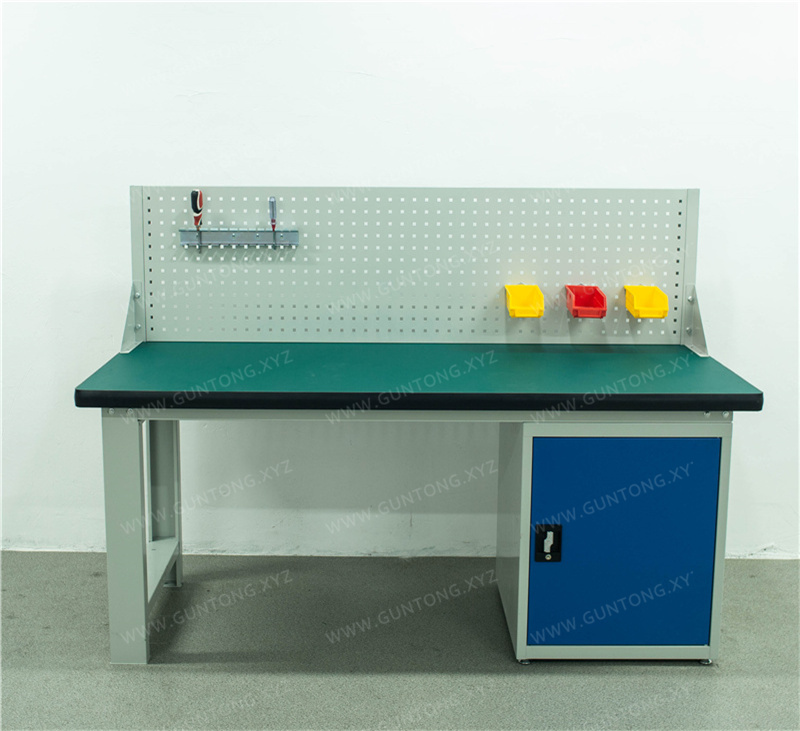
Pegboard Integration for Shadow Boards
Pegboards are essential for the "Set in Order" phase. When selecting workbenches or cabinets, prioritize integrated pegboard designs over aftermarket add-ons. For example, the Single Back Panel Single Door 4-Drawer Steel Plate Workbench features a dedicated back panel structure that supports square-hole pegboard accessories directly above the workspace. Similarly, Inner Half-Pegboard Storage Cabinets utilize dual pegboard layouts on cabinet doors and upper interior sections, maximizing vertical visual storage without increasing the footprint. This integration ensures that tool outlines remain aligned and accessible, supporting rapid audits.
Modular Drawer Configurations
Standardization requires consistent storage logic. Select equipment with tiered drawer heights to match tool categories. Verified configurations include combinations of different drawer heights within the same unit, allowing separation of small precision instruments from larger power tools. This physical segmentation prevents mixed storage, which is a common failure point in sustaining 6S discipline.
Step 3: Optimizing Mobility and Space Utilization
In maintenance and automotive scenarios, workstations are rarely static. Mobile equipment must maintain 6S order while in transit.
- Tool Cart Stability:*
- When selecting mobile units like the 4-Drawer 1-Door Tool Cart with Pegboard, verify the caster configuration. Compliant units feature two directional wheels at the front and two swivel brake wheels at the rear to ensure stable movement and secure locking. The inclusion of a standard square-hole pegboard on mobile carts extends visual management to point-of-use locations, eliminating the need for operators to return to fixed cabinets.
- Space-Efficient Footprints:*
- Standard dimensions for composite workbenches typically include modular lengths such as 1500mm, 1800mm, and 2100mm with standard depths. Adhering to these modular sizes allows for predictable floor planning and aisle width calculation, which is vital for maintaining clear pathways and safe egress routes as required by 6S safety protocols.
Implementation Boundaries and Risk Mitigation
While equipment selection is critical, operations managers must recognize the boundaries of what hardware alone can achieve.
- Customization vs. Standardization Balance:*
- While Guang'ErMei offers non-standard customization for unique needs, excessive customization can hinder future 6S scalability. Prioritize standardized modules where possible to simplify spare parts management and reconfiguration.
- Material Suitability:*
- Ensure desktop materials match the chemical and thermal environment. A raw steel plate composite top is suitable for heavy mechanical work but may require protective mats for delicate electronics assembly to prevent surface damage and contamination.
- Verification Requirement:*
- Always request current technical drawings and load test reports before procurement. Published specifications serve as a baseline, but site-specific conditions (e.g., uneven floors, seismic requirements) may necessitate engineering adjustments.
Next Steps for Operations Managers
- Audit Current Loads: Measure actual tool weights and frequencies at pilot stations before ordering.
- Map Workflow Zones: Define fixed vs. mobile storage needs based on operator movement patterns.
- Consult on Configuration: Engage with workstation equipment providers who offer on-site planning and 6S adaptation services to validate your layout against real-world constraints.
- Pilot and Iterate: Deploy standardized units in one cell first to verify ergonomic fit and visual management effectiveness before facility-wide rollout.
Effective 6S implementation starts with equipment that makes compliance the path of least resistance. By selecting verified, load-rated, and visually integrated workstation solutions, you build a physical foundation that sustains operational excellence.